


Graphics


Thread Starter
Scooby Newbie
Joined: Jan 2004
Posts: 14
Likes: 0

Hi Guys, I'm a new member of scoobynet and I was wondering what your overall views are on graphics on scoobies?
Also, I want to show you some piccies of my scoob after a fight with a Daewoo but I don't know how. Can anyone help?
Ta.
Scoobylou.
Also, I want to show you some piccies of my scoob after a fight with a Daewoo but I don't know how. Can anyone help?
Ta.
Scoobylou.


Scooby Regular
Joined: Oct 2002
Posts: 4,232
Likes: 0
From: Newquay

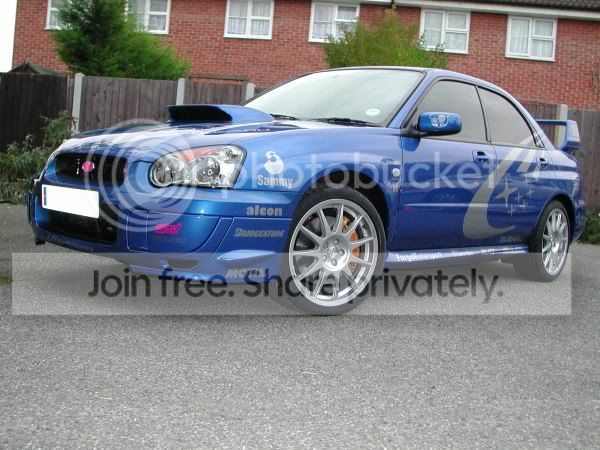
as seen on chrissy's the right car with graphics look awesome!!
anyone ever seen a wagon done that looks good though?
imho its for scooby saloons.?by the way the nissan looks good,..does it smoke? only kiddin..looks well..
anyone ever seen a wagon done that looks good though?
imho its for scooby saloons.?by the way the nissan looks good,..does it smoke? only kiddin..looks well..
Trending Topics




Thread Starter
Scooby Newbie
Joined: Jan 2004
Posts: 14
Likes: 0
Thanx for that info will try that.
I bet the blue Subaru was done by Andy at Onsigns in Castleford he has also done some graphics on my Scooby.
Anyone seen my Scoob about? Its red with two yellow stripes down the side teamed up with Subaru stars and "Subaru" lettering? I drive to Leeds everyday in it to work.
If you want some really decent graphics done, do what I did and go and see Andy at Onsigns (07747 682926).
Scoobylou
I bet the blue Subaru was done by Andy at Onsigns in Castleford he has also done some graphics on my Scooby.
Anyone seen my Scoob about? Its red with two yellow stripes down the side teamed up with Subaru stars and "Subaru" lettering? I drive to Leeds everyday in it to work.
If you want some really decent graphics done, do what I did and go and see Andy at Onsigns (07747 682926).
Scoobylou
Thread Starter
Scooby Newbie
Joined: Jan 2004
Posts: 14
Likes: 0
Right, I've registered with Photobucket as recommended and managed to get a picture stored in my album.
Don't understand the lingo so need a little help. How do I get my picture sent to this link from my album to let you guys see it?
Thanx
Scoobylou
Don't understand the lingo so need a little help. How do I get my picture sent to this link from my album to let you guys see it?
Thanx
Scoobylou


Scooby Regular
Joined: Dec 2003
Posts: 686
Likes: 0
From: www.stiracing.com

Scoobylou:
1. Register with a image uploader such as http://www.photobucket.com (I found photobucket user friendly and it's free but you can try others)
2. Upload your image to your photobucket account (image sizes must not be larger than 250KB but it will automatically resize images if they exceed this size)
3. Once the image is uploaded, open the full size image in photobucket
4. Right click on the image, select properties and the properties window will open
5. Copy the image address URL (image code) from the properties window
6. In your Scoobynet post, paste the image code that you just have just copied in between the following text "[*img*]" and "[*/img*]" (but without the "*" between "[]" or see the Scoobynet BBS code syntax on the left of your reply page for more details)
Note:
Sometimes the resolution of resized images is greatly reduced compared to the original image so try to reduce your image file size to 250KB before uploading as this will help you get better quality images (800x600 pixels are the best fit size images as they don’t run off the ScoobyNet page).
1. Register with a image uploader such as http://www.photobucket.com (I found photobucket user friendly and it's free but you can try others)
2. Upload your image to your photobucket account (image sizes must not be larger than 250KB but it will automatically resize images if they exceed this size)
3. Once the image is uploaded, open the full size image in photobucket
4. Right click on the image, select properties and the properties window will open
5. Copy the image address URL (image code) from the properties window
6. In your Scoobynet post, paste the image code that you just have just copied in between the following text "[*img*]" and "[*/img*]" (but without the "*" between "[]" or see the Scoobynet BBS code syntax on the left of your reply page for more details)
Note:
Sometimes the resolution of resized images is greatly reduced compared to the original image so try to reduce your image file size to 250KB before uploading as this will help you get better quality images (800x600 pixels are the best fit size images as they don’t run off the ScoobyNet page).


brett555 yes m8, could have been me, went to meet some lads for a drive,
cheers chrissy
scoobylou yes luv Andy did my graffics, Top lad
[Edited by scoobchrissy - 1/26/2004 7:11:36 PM]
cheers chrissy
scoobylou yes luv Andy did my graffics, Top lad
[Edited by scoobchrissy - 1/26/2004 7:11:36 PM]

Scooby Regular
Joined: Jul 2003
Posts: 818
Likes: 0
From: where the Fen Tiger roams.
Scoobylou,
I love the graphics on your red Scoob.
I have a MICA Red Classic and it's given me some ideas, but i think Silver graphics on my Mica Red Scoob would look better then yellow.
Anyone got any pictures of a stickered up Mica red in silver grahics or could i be the first??
I love the graphics on your red Scoob.
I have a MICA Red Classic and it's given me some ideas, but i think Silver graphics on my Mica Red Scoob would look better then yellow.
Anyone got any pictures of a stickered up Mica red in silver grahics or could i be the first??

Thread Starter
Scooby Newbie
Joined: Jan 2004
Posts: 14
Likes: 0
Pappasmurf,
Cheers, glad someone thinks its ok.
Sketch your ideas down on paper and take a piccie of your scoob then photocopy the piccie a few times. You can then go wild and see what your ideas will look like on your scoob before you commit.
Thats what I did. Mine's a mixture between street fighter graphics and subaru, hence the two stripes instead of three.
I think red and yellow rocks, its my trade mark!
Scoobylou
Cheers, glad someone thinks its ok.
Sketch your ideas down on paper and take a piccie of your scoob then photocopy the piccie a few times. You can then go wild and see what your ideas will look like on your scoob before you commit.
Thats what I did. Mine's a mixture between street fighter graphics and subaru, hence the two stripes instead of three.
I think red and yellow rocks, its my trade mark!
Scoobylou


Thread
Thread Starter
Forum
Replies
Last Post
gazzawrx
Non Car Related Items For sale
13
Oct 17, 2015 06:51 PM
LanCat
Non Scooby Related
9
Mar 23, 2001 10:32 PM