


Reversing Camera *** HELP NEEDED ***


Thread Starter
Scooby Regular
Joined: Jun 2005
Posts: 131
Likes: 0
From: Grantham Lincs
 Reversing Camera *** PROBLEM SOLVED***
Fitted an "XTRONS TD713" Double din head unit that I picked up from Ebay for £150 (will post pics soon)
Decided to buy a rear mount reversing camera which I fitted today.
I connected the + & - to the Reversing lights and at the head unit end I connected the + to the ignition red wire but the - didn't need connecting and the camera works fine when put in reverse.
The problem I have is that I have to select rear video on my head unit for it to display.
Now I know it can change automatically when the camera is activated but I am not sure which wire from the camera controls this????
would it be the front + or -
Thanks in advance
Matt
Decided to buy a rear mount reversing camera which I fitted today.
I connected the + & - to the Reversing lights and at the head unit end I connected the + to the ignition red wire but the - didn't need connecting and the camera works fine when put in reverse.
The problem I have is that I have to select rear video on my head unit for it to display.
Now I know it can change automatically when the camera is activated but I am not sure which wire from the camera controls this????
would it be the front + or -
Thanks in advance
Matt
Last edited by bingbangbong2001; Mar 17, 2011 at 06:43 PM. Reason: Problem solved!!!

Thread Starter
Scooby Regular
Joined: Jun 2005
Posts: 131
Likes: 0
From: Grantham Lincs
Xtrons Head Unit
The unit itself is great for the money.
The bluetooth Handfree is fantastic,
The mp3 is great as is the DVD.
The reversing camera is good and if the problem is solved, will make it fantastic.
The only downside that I can see is that in bright sunshine like todays makes it hard to see the display.
Other that that
The bluetooth Handfree is fantastic,
The mp3 is great as is the DVD.
The reversing camera is good and if the problem is solved, will make it fantastic.
The only downside that I can see is that in bright sunshine like todays makes it hard to see the display.
Other that that

Thread Starter
Scooby Regular
Joined: Jun 2005
Posts: 131
Likes: 0
From: Grantham Lincs
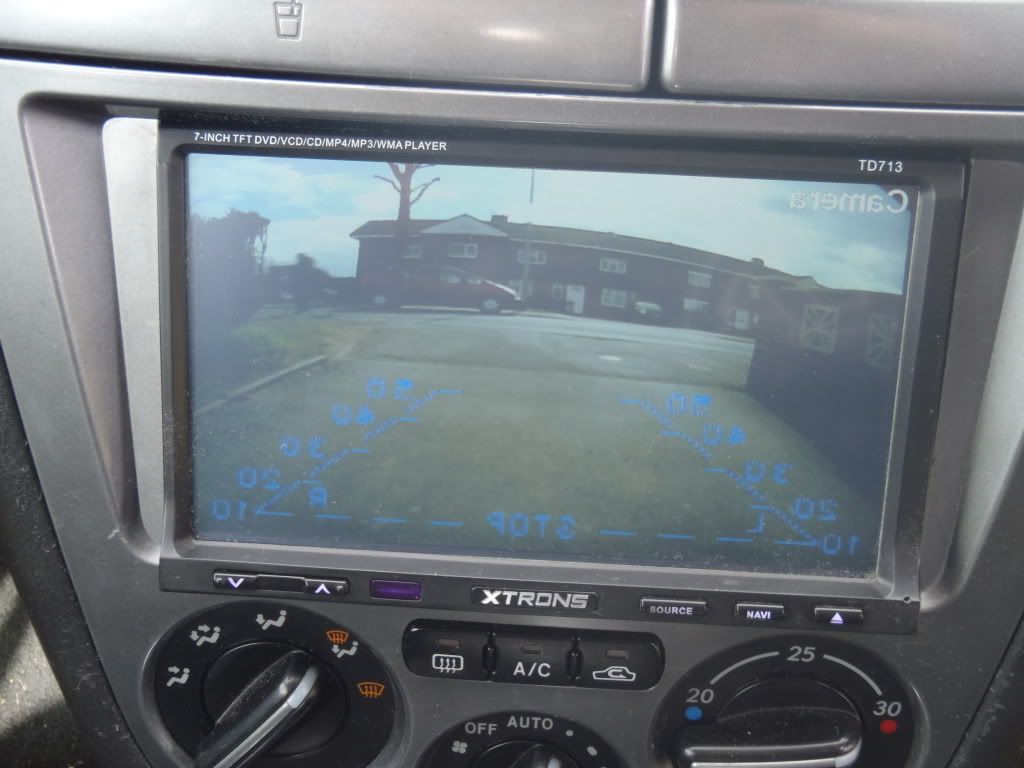
 Reverse Camera problem resolved!!!!!

Well I finally sorted out this annoying problem
and now whenever I put the car into reverse
The screen automatically switches to the
reversing camera

Trending Topics

Cooking on Calor
iTrader: (23)
Joined: Oct 2001
Posts: 23,346
Likes: 7
From: in a house full of girls!
I have the same head unit, well I did, I just gave it my dad, I got my reversing camera from maplins it was only £25 dont buy a more expensive one its not worth it 
I used to just have it permanant wired and press the cam button when I reversed.
I used to just have it permanant wired and press the cam button when I reversed.


Thread Starter
Scooby Regular
Joined: Jun 2005
Posts: 131
Likes: 0
From: Grantham Lincs


Scooby Regular
Joined: Oct 2008
Posts: 42
Likes: 0
From: kettering
hi mate,looks good.ive just bought one,you helped me make my mind up.you' re not on commission are you? lol going to fit it tomorrow,anyway lookin closely at your photo did you have to cut away a tiny bit of the interior away below the sterio to get it to fit?
Thread Starter
Scooby Regular
Joined: Jun 2005
Posts: 131
Likes: 0
From: Grantham Lincs
Hi, Yes, The surround simply pulls off, Unscrew the 3 screws holding the switch panel then trim from the bottom.
I found it best to use a stanley knife with a new blade and trim it a bit at a time.
Take the brackets from your original stereo and attach them to the new one and it should slip in no probs.
Any questions, don't hesitate to ask
Thread Starter
Scooby Regular
Joined: Jun 2005
Posts: 131
Likes: 0
From: Grantham Lincs
Scooby Regular
Joined: Oct 2008
Posts: 42
Likes: 0
From: kettering
Hi, Yes, The surround simply pulls off, Unscrew the 3 screws holding the switch panel then trim from the bottom.
I found it best to use a stanley knife with a new blade and trim it a bit at a time.
Take the brackets from your original stereo and attach them to the new one and it should slip in no probs.
Any questions, don't hesitate to ask
I found it best to use a stanley knife with a new blade and trim it a bit at a time.
Take the brackets from your original stereo and attach them to the new one and it should slip in no probs.
Any questions, don't hesitate to ask

Scooby Newbie
Joined: Jun 2018
Posts: 2
Likes: 0
From: Northern Ireland


Scooby Regular
Joined: Jul 2017
Posts: 630
Likes: 20
From: North wales
The lead that you get with the camera has a jack plug at each end but also has a thin yellow wire sticking out the jack plug. This yellow needs to be connected to the live that you run to power the camera from the reverse light in the boot. On the head unit end there should be a 'camera' wire on the back of the head unit. (mine was green and labeled but different head unit). The yellow goes to that lead then when you put it in reverse it tells the head unit to switch to camera automatically
Scooby Newbie
Joined: Jun 2018
Posts: 2
Likes: 0
From: Northern Ireland
The lead that you get with the camera has a jack plug at each end but also has a thin yellow wire sticking out the jack plug. This yellow needs to be connected to the live that you run to power the camera from the reverse light in the boot. On the head unit end there should be a 'camera' wire on the back of the head unit. (mine was green and labeled but different head unit). The yellow goes to that lead then when you put it in reverse it tells the head unit to switch to camera automatically

Thread
Thread Starter
Forum
Replies
Last Post
robbie1988
Wanted
2
Sep 13, 2015 09:25 AM
Scooby-Doo 2
Wheels And Tyres For Sale
1
Sep 9, 2015 06:51 PM
