


Clifford alarm wont turn off


 Clifford alarm wont turn off
Clifford 650 mk2 alarm will not turn of by fob is there another way to turn it off.
Managed to get the Clifford wizard to connect to lap top but get the message alarm need switching off, fob doesn't seem to be working.
Managed to get the Clifford wizard to connect to lap top but get the message alarm need switching off, fob doesn't seem to be working.
Last edited by SLAB; Jan 13, 2012 at 03:11 PM.
Have 2 fobs, both wont work they did but something happend a long the way of building the car up.
Thought if I bought the wizard it would help switch a few things off. but alarm needs to be disarmed
before wizard can get into the system
Thought if I bought the wizard it would help switch a few things off. but alarm needs to be disarmed
before wizard can get into the system
Last edited by SLAB; Dec 27, 2011 at 11:02 PM.


You should have something like this
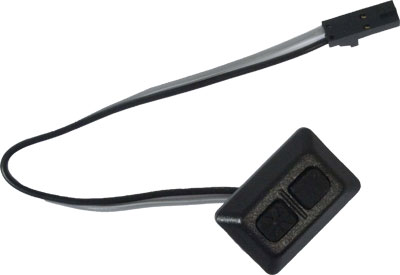
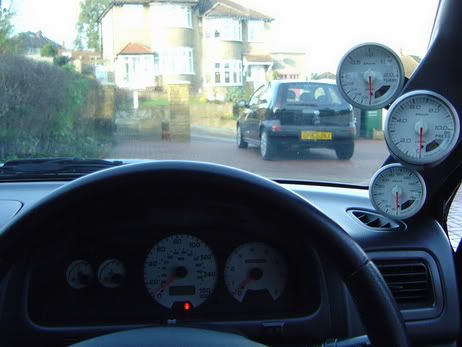
mine can bee seen just below the rpm dial on my dash
guide can be found here (see page 28)http://www.directeddealers.com/manua...730P_01-07.pdf
mine can bee seen just below the rpm dial on my dash
guide can be found here (see page 28)http://www.directeddealers.com/manua...730P_01-07.pdf
Last edited by darms; Dec 28, 2011 at 01:21 AM.
i had window probs with my alarm, like darms said you need the pin code. this will be in the users guide book if you have it.( comes in a small blue clifford plasic wallet ) and you tap that code into the two button pad like above.
i never had to do it as i sorted the problem out.
let me know if you want me to dig it out and send you a pic of the info?
but you will still need your unique 4 digit pin code?
i never had to do it as i sorted the problem out.
let me know if you want me to dig it out and send you a pic of the info?
but you will still need your unique 4 digit pin code?
Trending Topics

Scooby Regular
iTrader: (3)
Joined: Aug 2000
Posts: 25,565
Likes: 2
From: 1600cc's of twin scroll fun :)
You may well need a dealer/installer to look at the system as (like mine) the 4 digit number on the back of the book no longer applies as ive had it changed.
Tony
Tony
i had window probs with my alarm, like darms said you need the pin code. this will be in the users guide book if you have it.( comes in a small blue clifford plasic wallet ) and you tap that code into the two button pad like above.
i never had to do it as i sorted the problem out.
let me know if you want me to dig it out and send you a pic of the info?
but you will still need your unique 4 digit pin code?
i never had to do it as i sorted the problem out.
let me know if you want me to dig it out and send you a pic of the info?
but you will still need your unique 4 digit pin code?
 that should be it.
Only kidding about the code its not mine, thought ide better say before i get slaughtered lol
Scooby Regular
iTrader: (3)
Joined: Aug 2000
Posts: 25,565
Likes: 2
From: 1600cc's of twin scroll fun :)

Example is 1234, its the top button 1 then the bottom button once, then 2 on the top, once on the bottom, 3 on the top, once on the bottom, 4 on the top, once on the bottom and you should see the light light up on the alarm indicator (that nice blue button with clifford on it)
Tony
Last edited by TonyBurns; Dec 29, 2011 at 10:12 PM.

Scooby Regular
Joined: Feb 2011
Posts: 291
Likes: 0
From: scotland
mines sets but alarm goes off after 30 seconds or so..been sat in garage a few months with no battery in car..cant seem to find my wee pad for putting pin in..car starts runs sound but if alarms set closes windows an stuff n chirps but alarm goes off
Scooby Regular
iTrader: (3)
Joined: Aug 2000
Posts: 25,565
Likes: 2
From: 1600cc's of twin scroll fun :)

Scooby Newbie
Joined: Apr 2007
Posts: 17
Likes: 0
Would this not put it into valet mode? or does that only work when the alram is not activated and/or on older alarms?
Or am I just wrong altogether... sure my old Cobra alarm had to be disconnected this way to disarm when the battery was low and caused it to go off.
Or am I just wrong altogether... sure my old Cobra alarm had to be disconnected this way to disarm when the battery was low and caused it to go off.
@ slab, sorry mate aint checked this thread for a while.
if you dont have the little clifford book, i can scan it and send it to you.
the code is on the back of the book. ( but i aint gonna send you my code lol )
let me know if this will help you out?
im sure clifford must have a standard code to use, like with mobile phones...
if you dont have the little clifford book, i can scan it and send it to you.
the code is on the back of the book. ( but i aint gonna send you my code lol )
let me know if this will help you out?
im sure clifford must have a standard code to use, like with mobile phones...
@ slab, sorry mate aint checked this thread for a while.
if you dont have the little clifford book, i can scan it and send it to you.
the code is on the back of the book. ( but i aint gonna send you my code lol )
let me know if this will help you out?
im sure clifford must have a standard code to use, like with mobile phones...
if you dont have the little clifford book, i can scan it and send it to you.
the code is on the back of the book. ( but i aint gonna send you my code lol )
let me know if this will help you out?
im sure clifford must have a standard code to use, like with mobile phones...
Ps if anyone wanting a cheap £35+£4 p&p brand new Clifford concept 500 check my ads
cheers m8 had a go to day did something because the alarm went off, tried to get the wizard on wont connect something about port name wrong cant find port1 port 2.3 not found.
Good job i don't drink or ide of been on the port the day i have, trying to get his dam wizard to connect, managed to get it on last time but alarm needed to be turned off
Good job i don't drink or ide of been on the port the day i have, trying to get his dam wizard to connect, managed to get it on last time but alarm needed to be turned off
Still no joy with this wont turn off with valet nothing happens ,the fobs are like new when any button is pressed there's nothing as iif the fobs from another alarm but it has work before doing my nut in :ma d:
:ma d:

Scooby Regular


Joined: May 2000
Posts: 3,238
Likes: 66
Key in the ignition - turn to the 'fully' on position - then follow tony's instructions above
